
Bring your store over, and undo it if you change your mind
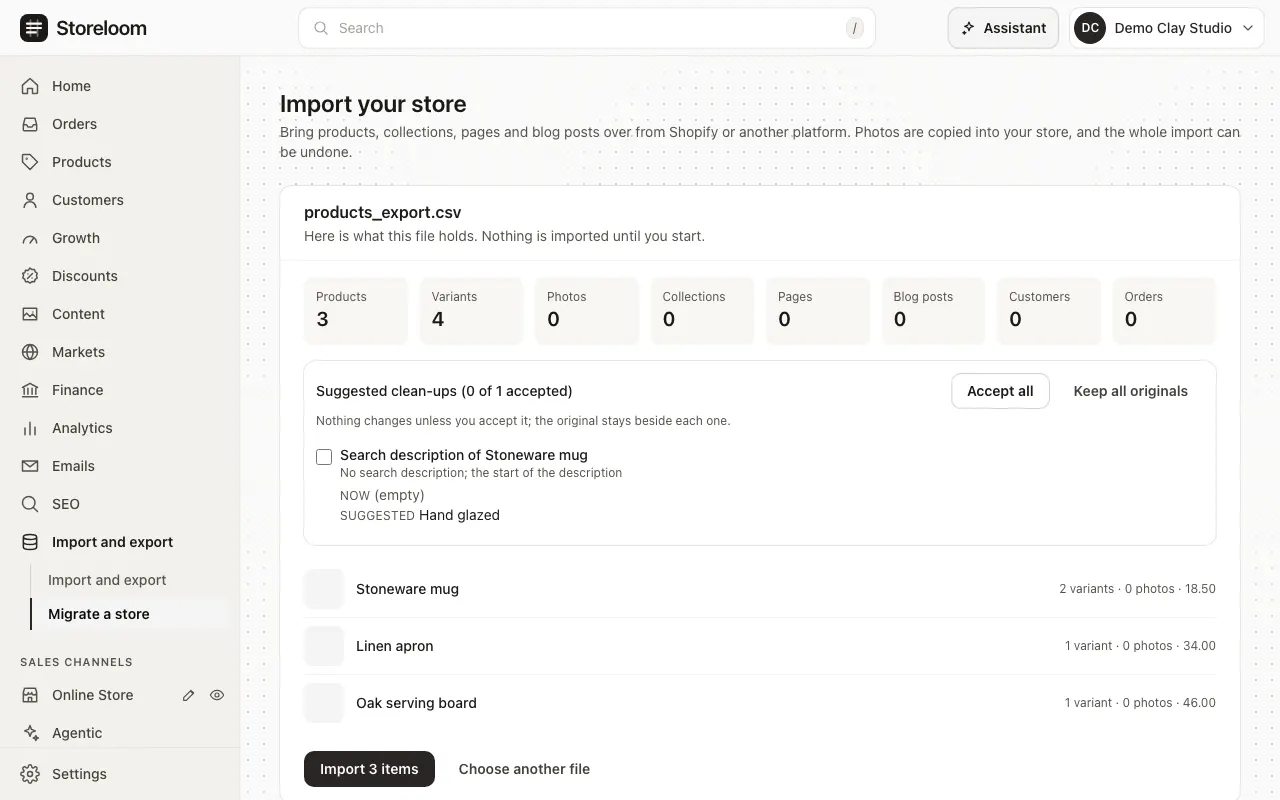
Upload an export from Shopify, or read your old store from its address. Storeloom shows what it found and suggests clean-ups before anything is imported, and the whole import can be undone in one step.
- Available built and tested
- Beta built, with limits we name
- Coming soon not built yet
See it before anything is imported
AvailableUpload a Shopify export. Storeloom counts the products and variants, shows each suggested clean-up beside the original, and imports nothing until you start. One step undoes the whole import.
In the docs: Migrate a store
Or read your old store from its address
AvailableGive your old store’s address and Storeloom reads its public pages the way a visitor sees them, in one step.
In the docs: Migrate a store
Customers and orders too
AvailableBring your customers and past orders, find them in the admin, and still handle a customer’s request to be forgotten.
In the docs: Migrate a store, Customers
From WooCommerce, BigCommerce and Magento
AvailableExports from other platforms come with a column mapping you can check, and the same suggested clean-ups.
In the docs: Import and export
Your design, rebuilt as a theme
Beta: page renderer not connected yetStoreloom reads your old store’s colours, fonts, header, footer and home page, and rebuilds them as a theme you preview and compare before applying.
- Stores that draw their pages with JavaScript are read fully once the page renderer is connected
In the docs: Migrate a store
Old addresses keep working
AvailableEvery address of your old store that moves gets a permanent redirect, so links and search results keep working.
In the docs: URL redirects